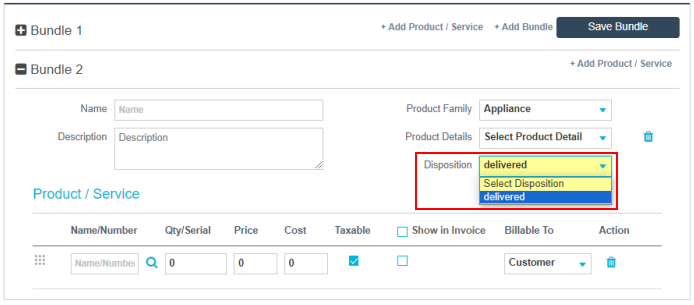
Bundle Settings
In the Bundle Settings menu, you can create your own custom dispositions for the bundles created within your ServiceWorks account. When created, these dispositions will determine whether or not the items in the bundle are added to the invoice sent or removed from inventory upon being changed to that status.
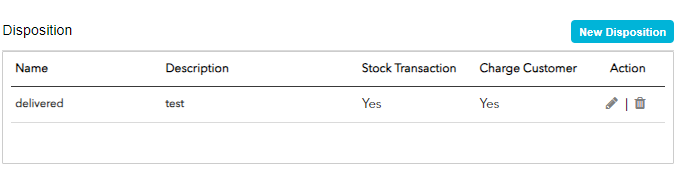
In the Bundle Settings menu, you’ll be able to view a list of all your previously created custom dispositions. To create a new disposition, click the New Disposition button
Upon clicking the new disposition button, a popup will appear allowing you to do the following:
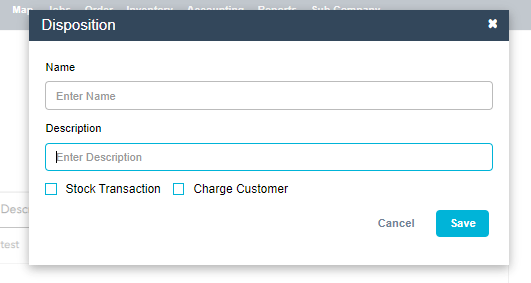
- Name - Enter a name for your disposition
- Description - Enter a description for your disposition
- Stock Transaction - Enable stock transaction (or determine whether or not this disposition removes the item from your inventory when applied)
- Charge Customer - Enable Customer Charge (or determine whether or not this disposition adds the charge for items or services to the invoice)
Once satisfied with your selection, click Save to continue, and your new disposition will be ready to use for future bundles on jobs or estimates.
For more on how to add bundles to jobs, click HERE
Impact of Bundle
You need to select Disposition in Job edit page > Bundle > Create New Bundle.