Create Job With Recurrence
What is recurring job?
A recurring job is a service that is set to automatically repeat for the same client based on a pattern you create. This feature works by creating an exact copy of the job and its information, then cloning it over several designated days.
Why do you need to create recurring job?
Creating a recurring job in ServiceWorks helps companies in optimizing their workflows by automating repetitive jobs and establishing reliable service provision.
Recurring Jobs can be used for scenarios such as:
- Regularly occurring services (ex. a weekly pool cleaning service)
- Honoring a client’s long-term contract (ex. cut grass every 2nd Tuesday)
- As reminders for future work to be done (ex. check HVAC units monthly)
How to create Recurring Job?
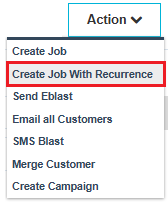
You can create recurring job for any selected customer from the Action drop down menu in the Customer Page.
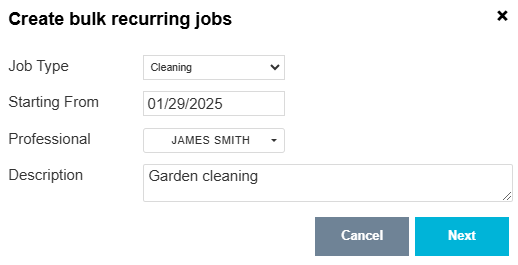
Select job type, enter the start date of the recurrent job. Select professional.Give a description of the job and click 'Next'.
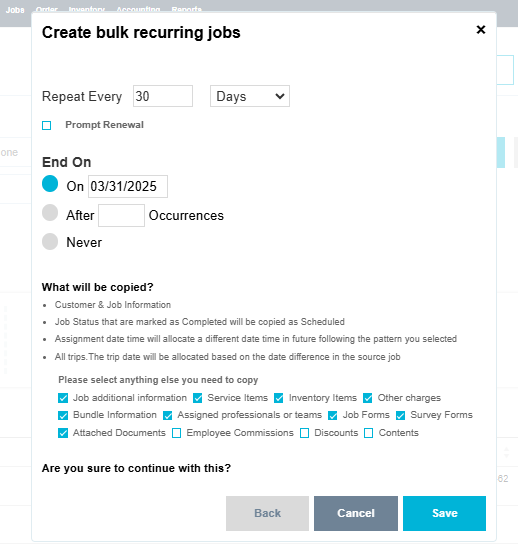
In the next page you can enter repeat frequency. Enter the date when the job will finish or you can mention the number of occurrences.
What will be copied?
- Customer & Job Information
- Job Status that are marked as Completed will be copied as Scheduled
- Assignment date time will allocate a different date time in future following the pattern you selected
- All trips.The trip date will be allocated based on the date difference in the source job
Please select anything else you need to copy
- Job Additional Information
- Service Items
- Inventory Items
- Other Charges
- Bundle Information
- Assigned professionals or teams
- Job Forms
- Survey Forms
- Allotted Documents
- Employee Commissions
- Discounts
- Contents
Finally save the recurrent job.
Facilities you find with creating recurrent job:
- Save time, by duplicating basic information from your original job (“parent”) to its recurrence clones (“children”)
- Improve customer service, by allowing you to easily provide clients with visibility into future visits
- Keep your business running, by ensuring you don’t forget to perform important services
The recurring jobs feature will auto-assign the same professional team you selected for the main job. Or if it was unassigned, it will auto-generate unassigned jobs, which you can then assign using our powerful optimization tool.